





DME billing managers: Are your claims languishing? Are reimbursements lagging? If so, you need to take a look at your operation’s throughput.
Throughput reveals how efficiently and effectively orders move from intake to payment, and where they’re getting stuck, sort of like a health check for your operations.
“Throughput metrics aren’t just one number—they reflect how well orders are moving through each stage of the workflow,” says Chris Delposen, managing director at Medbill.
Yet, many providers don’t measure throughput at all. Or they rely on outdated methods like manually tracking reports in Excel, resulting in missed opportunities, delayed payments, and little visibility into what’s really happening inside the billing process.
What Throughput Tells You About Your Operations
If you could follow every order through your billing process in real time, you’d quickly see where things are humming along and where they’re stalling. That’s what throughput delivers: a detailed, stage-by-stage view into your operational health.
By tracking throughput, you can:
- See exactly how long orders spend in each status, from setup to reimbursement.
- Identify bottlenecks, such as delays in documentation, insurance verification, or claim submission.
- Spot patterns, like seasonal slowdowns or recurring issues with specific payers.
- Understand whether your current staffing strategies and workflows are keeping pace with demand.
In essence, throughput helps answer the critical question: Are we getting paid for the work we’re doing, or is something about our process slowing us down?
Common Signs of Poor Throughput
Throughput issues often show up in predictable ways. If you notice the following signs, it’s time to take a closer look at your workflow.
- Setup volume exceeds bill volume: “If the number of billed claims consistently lags behind the number of new setups, that’s a sign your throughput is suffering,” says Deplosen. This often happens when claims get stuck waiting on documentation, insurance verification, or other prerequisites, meaning revenue is sitting in limbo while expenses keep adding up.
- Orders frequently age past seven days in key stages: When orders linger too long in certain parts of the process, payment is delayed, and the backlog can quickly snowball. Aging past seven days is a red flag that something in your workflow is broken or under-resourced, creating a bottleneck that affects the entire revenue cycle.
The Risks of Manually Tracking Throughput
For many DME providers, the standard way to measure throughput is to pull an Outstanding Sales Order (OSO) report from their billing software, export it into a spreadsheet, and spend hours sorting, filtering, and calculating. “You have to be an Excel expert. And even then, it’s time-consuming and error-prone,” Deplosen says.
Relying on manual tracking can lead to:
- Missed billing opportunities and delayed reimbursements. If you can’t see stalled orders until your next report, valuable time is lost, and payers won’t speed up just because you’re behind.
- Cash flow issues. When equipment is delivered before claims are billed, you’re incurring costs without collecting revenue, creating a financial gap that’s hard to close.
- Increased risk of human error. Every extra step (copying, pasting, filtering, building formulas, etc.) increases the chance of mistakes that can skew your data or cause missed claims.
Further, this task often falls on owners or billing managers, adding a significant administrative burden on top of their other responsibilities. And because the data is already outdated by the time the report is built, it’s nearly impossible to act on it in real time.
The Takeaway: Manually tracking throughput keeps you in a reactive mode, making it hard to scale and even harder to fix problems before they start costing you money.
Improving Throughput: 4 Best Practices for a Faster, Smoother Workflow
If your billing process feels stuck, these four best practices can help you regain control and keep orders flowing steadily.
1. Ditch the Spreadsheets
Instead of relying on manual reports, Delposen recommends using a visual throughput dashboard (like the one built into TrueSight).
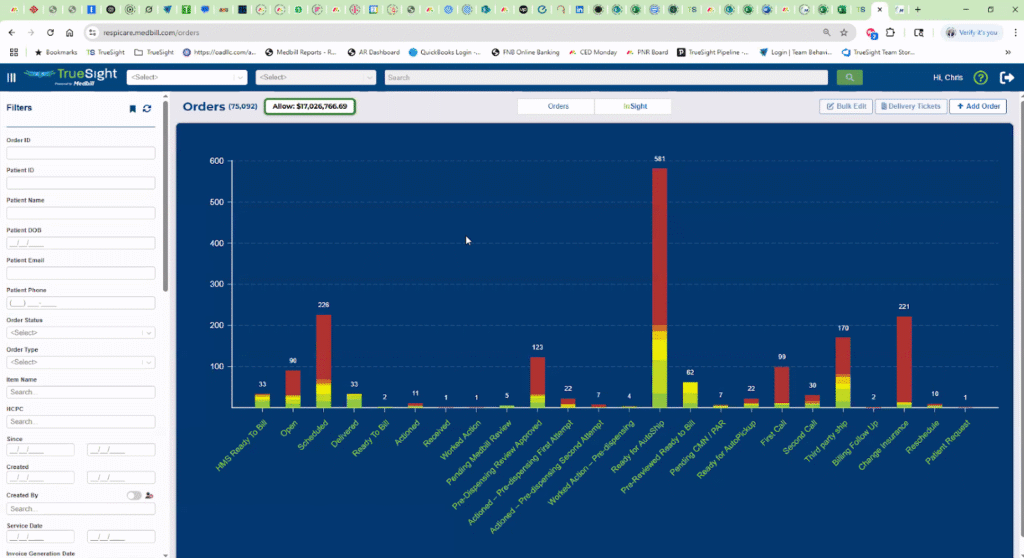
“We created this dashboard to be the first visual tool inside the system, so providers could stop guessing and start seeing where orders are getting stuck,” he says.
When tracked visually, throughput provides:
- A real-time pulse check on operational flow
- Insight into bottlenecks, such as delays in documentation or insurance changes
- Early warnings about cash flow issues if setups outpace billing
- A foundation for staff accountability and better resource allocation
Ready to think outside the spreadsheet? Learn more about TrueSight.
2. Segment Responsibilities and Assign Owners for Each Stage
Strong workforce management is a cornerstone of throughput improvement.
“Segregation and specialization of duties can significantly improve throughput, just like in lean manufacturing,” says Delposen. “When each employee owns a specific part of the process, it’s easier to hold people accountable and fix what’s broken.”
Related: Efficiency Without Burnout: Using AI to Support Lean Billing Teams
3. Leverage Task Management and Automation
Automation saves time, but it also acts as a safeguard against missed steps. When you invest in a billing platform with automation, you ensure that every follow-up, approval, and verification has a clear owner and deadline.
“When you send a document request in TrueSight, you can automatically create a follow-up task with a due date and assign it to a staff member—so things don’t just fall through the cracks,” Delposen explains.
Automated task management keeps orders moving by:
- Prompting staff to follow up before a delay becomes a bottleneck
- Ensuring accountability for high-touch stages like documentation or insurance verification
- Reducing the mental load of remembering dozens of next steps across multiple orders
4. Track and Revisit Aging Thresholds and Bottlenecks
Even the most efficient workflows can grind to a halt if certain stages start aging beyond acceptable limits. Orders stuck in stages like “Docs Pending,” “Insurance Change,” or “Verification Needed” can quietly pile up, slowing your cash flow without anyone noticing until it’s too late.
“Insurance changes and unverified insurance are common reasons for orders to stall—and they’re easy to overlook,” says Delposen. By setting clear aging thresholds for each stage and reviewing them regularly, you can spot bottlenecks before they turn into backlogs.
For example, if your target is to keep documentation review under three days but the average is creeping up to five, it’s a signal to reallocate resources or adjust processes.
Consistent monitoring ensures your team is addressing delays in real time, rather than scrambling to catch up after revenue has already been delayed.
Stop Flying Blind—Bring Clarity to Your Billing Process
If you want a clear view into every step of your billing process, you need an AI-powered platform designed to turn data into insights. Enter: TrueSight, Medbill’s proprietary revenue cycle management solution.
With TrueSight, you get:
- Custom stages tailored to your business’s workflow—no one-size-fits-all approach
- Real-time visibility into order aging, highlighting where orders are stuck before they become problems
- Built-in alerts, task tracking, and automation designed to streamline high-touch steps like documentation and insurance verification
Beyond the tool itself, our team provides ongoing support, working closely with you to ensure you’re measuring what matters most and empowering your staff with actionable insights.
Take the guesswork out of throughput management. Schedule a needs analysis with one of our revenue cycle management consultants today.
Or, keep exploring the latest content on the Medbill blog: